
Making Stickers in Procreate for Beginners: Watch Me Mess Up So You Don’t Have To

Hey hey! If your to-do list is currently giving “send help” energy but you still want to make something pretty… same. You're in the right place.
Today, we’re making a dreamy watercolor dahlia sticker in Procreate with the words “bloom, wild, and free.”
Because yeah, that’s the vibe we’re trying to manifest while multitasking snacks and laundry piles.
Making stickers in Procreate for beginners is a low-pressure tutorial where I walk you through everything step-by-step from messy sketch to the final sticker outline.
No perfection needed. Just good creative chaos.
You can find other sticker design tutorials on my website to keep that creativity flowing.
Table of Contents
Embrace the Chaos and Create: A Sticker Tutorial for Busy Bees
We were out running errands the other day (you know… the usual grocery shopping and “did we really need to leave the house for this?” kind of vibe), and it’s already heating up here in Texas.
Like, hot enough to regret wearing jeans kind of warm.
And if you’ve lived here long, you know the moment the sun comes out, everyone suddenly gets the urge to plant all the pretty things.
I don’t know what it is, maybe we’re just over the blah, wintery vibes and need something alive and colorful again.
A chaos-friendly shortcut to cute, layered Procreate stickers — even if you’ve never opened the app before.
I created this kit because when I opened Procreate the first time, I had no clue what to tap, layer, or brush. If that’s you, you’re not behind — you’re just beginning. Let’s make it easy and fun.
Grab your starter file, brushes & layer guide. Let’s make stickers!

So naturally, like the rest of Texas, we ended up “just looking” at the garden center.
Between the blueberry bushes, koi ponds, and those tough-as-nails succulents, I spotted her—this dreamy dahlia—and had to snap a quick pic.
Meanwhile, my toddler was on a mission to sniff literally every plant like a tiny, chaotic garden gnome.
That quick photo is what inspired today’s sticker! You can totally use it too for drawing and to create a color palette 💛 Dahlia reference photo

Making Stickers in Procreate for Beginners
1. Setting Up Your Canvas
First things first, let's set up our canvas in Procreate.
Choosing the Right Size
A good starting point is a 2000 x 2000 pixel canvas. This size works great for stickers.
If you're thinking bigger like greeting cards or even wall art you might want to go larger, like 3500 x 3500 pixels or more.
Keep in mind that the larger the canvas, the fewer layers you'll have available. Read all the deets on canvas sizes over on Best Canvas Size for Procreate Stickers (Beginner Guide)
2. Color Profile
Now, let's talk color profiles. You've probably heard of CMYK and RGB. CMYK is generally used for printing, while RGB is for screens.
For consistent colors across different devices, I recommend using sRGB IEC. It's usually just fine for home printing. For your best bet, try both color profiles on your printer.
TIP: If you are sending off to a printer check them for printing requirements!

Gathering Inspiration and Sketching Your Dahlia
Let's get inspired and start sketching!
3. Using a Reference Photo
A reference photo can be super helpful. To import one into Procreate, go to Actions (the wrench icon) > Reference > Toggle On > Import Image.
I also like to create a color palette from my reference photos. In the Palettes panel, just tap the plus sign and choose “New from Photos.”
You can find the dahlia reference photo that I used here.

4. Loose Sketch with 6B Pencil
Grab the 6B pencil brush. It comes standard with Procreate and is perfect for a loose, sketchy outline.
Start with a small, almost cloud-like shape for the center of the flower. Then, add petals around the center, using curved lines.

Don't be afraid to rotate your canvas as you go. Remember, flower petals aren't perfect, and that's part of their charm!

Build up layers of petals until your flower looks full and balanced. Don't be shy about using the undo button.
It's easier to correct mistakes as you go rather than trying to erase later.

5. Turning Sketch into Line Art
Next, create a new layer on top of your sketch layer. Set the sketch layer to “Multiply” and reduce the opacity.
This lets you trace on top of your sketch to make your final line art.

Coloring Your Dahlia
Time to bring your dahlia to life with color!
6. Base Colors
Create a new layer named “Base Petals” and place it under your line art layer. Pick a reddish-orange color from your palette.
For this step, I used the Water Bleed brush, but play with whatever feels right.
Apply the base color to the petals, leaving some areas uncolored for that classic watercolor look.
If you make a little line that you don't like, just use the smudge tool (set to your current brush) to blend the edges.
Create another layer called “Base Center” and fill it with a vibrant yellow.Give the center some sunshine.

7. Shadows, Highlights & That “Sticker Pop”
Make a new clipping mask layer over your color layer so you don’t paint outside the lines (bless).
I used a darker tone for shadows with the Wet Glaze brush.
For highlights, I tapped around with a sponge-y brush and then blended it to keep things soft.
Want more drama? Add deeper shades near the center. Want less? Don’t. That’s the beauty of digital — undo is your BFF.

8. Adding Detail to the Flower Petals
Try using a monoline brush to add a center line to some petals.

9. Adding Texture
Experiment using a water wash to add some texture to some of the flower petals.

10. Details on the Flower Center
Add small splashes of a darker color to the center with a small brush to add depth to the flower.
11. Emphasize Quick Detailing
Remember, we're going for a quick and easy sticker, so don't get bogged down in perfection!

Adding Text and Creating the Sticker Outline
Aka, the bane of my existence. I'm the worst at adding text in this app!
12. Adding Text
Go to Actions > Add > Add Text to add the phrase “Bloom, wild and free.”
Procreate's text tool can be a little finicky, but don't give up!
I chase it all around…I assume it's me and not the tool, so hopefully you'll have better luck!
Finalize Text
Before switching off your text layer make sure you are finished with it and happy.
Once you click on a new layer your text is rasterized and you can no longer manipulate.
You will need to delete it and start over if you want to make changes!

Experiment with different fonts, sizes, and colors until you find something you love. Position the text where it complements your dahlia.
If you're really struggling, you can always export your design and add text in Canva.
I find text boxes in canva to be a little bit easier to manipulate but then of course you are having to deal with two different applications.

13. Creating the Sticker Outline
Create a new layer at the very bottom of your layer stack.
Use the monoline brush (or a sticker outline brush if you have one) to carefully draw an outline around the entire design. A clean outline is important if you plan to use a cutting machine. Once you're happy with the outline, fill it with a solid color.
I created an entirely Free Procreate Starter Kit that includes a free sticker outline brush, a cheat sheet on layers, and an entire layered sticker file so you can see step by step how I make a sticker. Grab it by entering your email below!

14. Cleaning Up Overspray
You might notice some “overspray” from the watercolor brushes. You can clean it up for a crisp look, or leave it for a more artistic vibe.
Cutting Machines
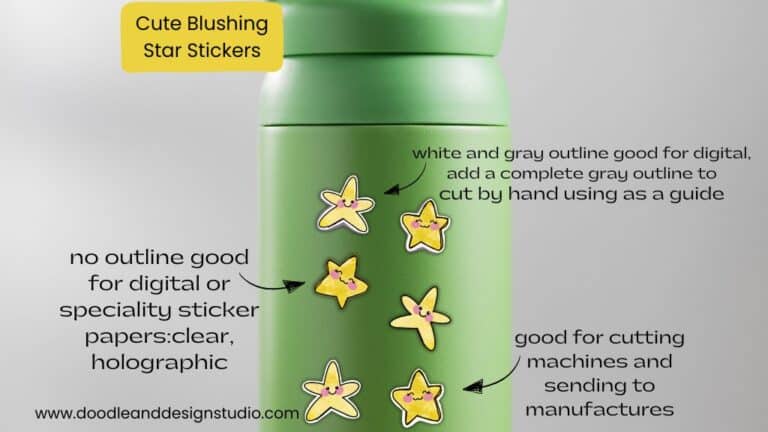
If you're using a cutting machine, keep in mind that it relies on precise lines signaling the light where to cut, so cleaning up the overspray might be necessary.

Got sticker fever? I’ve got even more fun ideas waiting for you check out these creative ways to use them!
Final Touches and Exporting
You didn’t just draw a flower you carved out time to be creative, which is a win in itself.
This sticker is your little reminder to bloom exactly where you are. Wild, free, and probably slightly exhausted…but still showing up.

15. Exporting the Sticker
Make sure you turn off your background layer, it should be the bottom layer in your layers menu.
Go to the Actions menu and select “Share.” Choose PNG format to save your image with a transparent background.
Save it to your desired location, and you're done!
So, that's how you create a gorgeous dahlia sticker! It may have taken you some time but that's ok, you took some time out of your busy day to grow your creativity!
Thanks for hanging out with me making stickers in Procreate for beginners just wouldn’t be the same without your chaotic charm and creative energy.
Ready for Your Next Creative Break?
If you loved this one, check out my tutorial for the blushing star sticker it’s cute, quick, and just as beginner-friendly.
I also have a YouTube channel with more tutorials for stickers and digital art for even more of my little creative chaos corner.
We’re not chasing perfect. We’re making magic in the mess.
Remember, it's all about taking time for yourself, expressing your creativity, and embracing the “bloom, wild and free” spirit.
💛 Cynthia
Your chaotic creative bestie
Want More Procreate
Whether you’re just starting out or ready to try your next cute design, here’s a full list of tutorials, tips, and easy wins for making stickers in Procreate:
Start Here: Beginner-Friendly Guides
- Procreate Beginner Guide for Stickers
- Making Stickers in Procreate for Beginners
- How to Design Stickers in Procreate
- How Procreate Stickers Boosted My Confidence as a Creative Mom
- How Procreate Helped Me Reconnect with Creativity
- What I Learned from Trying A Daily Sticker Sketch Challenge(and Failing Sometimes Too)
Learn Cute Sticker Drawing Techniques
- Draw a Cute Blushing Star Sticker
- Designing a Cute Bunny Sticker
- How to Draw Cute Cherries
- Draw a Cloud in Procreate (Easy!)
- Design a Daffodil Sticker in Procreate
- Draw a Baby Duck in Procreate
- How to Make Your First Digital Sticker in Procreate (In 10 Minutes!)
- 3 Easy Outline Effects in Procreate That Make Your Stickers Pop
Procreate Tools, Ideas & Tips
- Easy Procreate Sticker Ideas
- Sticker Making Tips in Procreate
- Procreate vs Canva for Sticker Design
- How to Design Stickers
- Procreate Tools for Sticker Design: The Beginner’s Guide for Burnt-Out Moms
- Using Layers for Stickers in Procreate
- Clipping Masks For Procreate Stickers (with Less Stress and More Fun!)
- Best Canvas Size for Procreate Stickers (Beginner Guide)
- Best Procreate Brushes for Stickers (Free & Paid)
- Resizing Stickers in Procreate: The Busy Mom’s Guide to Sanity, Success, and Not Losing It
- Procreate Color Palettes for Stickers, Effortless Sticker Color Magic
- Eraser Tool Tips for Procreate Stickers (That Even Exhausted Moms Can Master)
I have also created an entire Procreate Starter Kit with a complete sticker file so you can see exactly how I made it!
Add a little sparkle to your Pinterest board these cutie pins are just waiting to be saved to your Sticker Making inspo stash!