
Best Procreate Brushes for Stickers (Free & Paid)
If making stickers in Procreate sounds kinda fun but also a tad overwhelming, hi, you’re very much in the right place.
When you’ve been juggling a million things and your brain feels fried, finding the best Procreate brushes for stickers can be the difference between “wow, this is actually relaxing” and just giving up mid-doodle to binge reality TV.
Sis, I want you to be able to do both at the same time if you so desire.

The right brushes can flip sticker design from a messy, frustrating chore into something genuinely fun, even if it’s just you, your iPad, and five blessed minutes of quiet (okay, maybe three).
Whether you want easy outlines, bold colors, or just want the process not to stress you out, picking the best Procreate brushes for stickers isn’t just smart, it’s practically self-care.
Table of Contents
What Makes the Best Procreate Brushes for Stickers
If you've ever done the “which brush even works for stickers” dance on Procreate with a half-melted coffee nearby, you get it.
Not every brush out there is sticker-worthy, and one size doesn’t fit all.
The best Procreate brushes for stickers should just work without extra fiddling, because honestly, who has time for that?
Here’s what makes a brush worth adding to your favorites, and what makes you want to throw your iPad across the room.
Make Your First Sticker in Procreate
Grab your starter file, the brushes, tips, and step-by-step cheatsheets you need to design your first cute sticker today.
Pressure Sensitivity: Effortless, Smooth Lines
You know that feeling when a brush responds to your hand just right? Pressure-sensitive brushes are the gold standard for stickers.
They let you lay down thick, bold outlines or whisper thin sketch lines with the same tool, no need to swap brushes every two seconds.
You get smooth, steady strokes that look professional even if your hand’s a little shaky from that third coffee.
Clean Edges: A Must for Cutting Machines
If you want to use a Cricut or Silhouette, clean edges aren’t just “nice to have”; they’re non-negotiable.
Brushes with crisp, solid edges make your stickers so much easier to cut.
It’s way less fussy, the machine can read the outline, and your stickers pop out neatly instead of looking like your toddler cut them out with safety scissors.
Print Ready Texture: Looks as Good on Paper as on Screen
Texture is where the magic happens, but it can also get you into trouble. Some brushes look awesome onscreen but get weird and muddy when printed out.
The best brushes for stickers give you texture that adds character, think subtle watercolor or a doodle style scuff, without getting blotchy in print. Of course, this one you have to do test prints to find out!
If you want even more ideas for fun sticker looks, check out (creative sticker art projects) for inspo you can try with any style.

Stamp Brushes
Stamp Brushes: Fast Track Your Designs
Sometimes, speed matters (like when nap time is ticking down or you just want one quick win today). Stamp brushes are actual lifesavers here.
They let you add stars, hearts, sparkles, or any repeating shape instantly. Pop, pop, pop, your page is suddenly full of cute. They’re perfect if you love building up doodle sheets or want to make themed sticker packs fast.
Time Saving Features: Because “Me Time” Is Rare
Let’s be honest, burnout and busy schedules mean you need tools that save time.
Brushes that are easy to use, don’t need a ton of extra tweaking, and give you a finished result fast?
Worth their weight in gold. Extra points if a brush set includes shadow or highlight options so you can fake fancy in half the time.
Check out these additional Procreate tools for sticker design that make the process even smoother.
Opacity and Smoothness: Crisp, Adjustable Color Fills
Stickers look their best with solid colors you can actually fill without patchy messes.
Brushes that offer strong opacity guarantees you get bold, punchy color that stands out whether you’re using pastels or neons.
Smoothness is key, too, nobody wants bumpy outlines that look more “potato” than “polished.”
If layers in Procreate make you feel like you need a degree in digital chaos management, you're not alone. I broke down my favorite ways to use layers for sticker design — without crying into my Apple Pencil. Read the beginner-friendly guide to layers in Procreate here.
Matching the Brush to Your Sticker Style

Built-in Watercolor Brushes
You’re allowed to change your mind and your vibe. Some days it’s all hand drawn squiggles, other days you want neat, flat color. Here’s a mini cheat sheet for matching brush types to sticker styles:
- Doodle or sketch: Look for textured, pencil like brushes (think casual and artsy)
- Watercolor: Soft, blendy brushes for painterly effects
- Stamp: Pre made shapes for build it quick sticker sheets
- Outline/Inking: Sharp edged, smooth chiseled brushes for pro level cuts
If you’re wanting more ideas for sticker styles, you’ll love these creative sticker usage ideas that go beyond basics and keep things fun.
Top Free Procreate Brushes for Sticker Making

Glitter and Metallic Brushes
Let’s be real, nobody wants to hunt for “the best Procreate brushes for stickers” when you barely have time to blink, let alone research art supplies.
If you’re like me, you just want to know what works without all the runaround, especially if it’s free.

Monoline and Techinal Brush
Good news, some of the best sticker brushes are sitting right in your Procreate app, and a whole world of friendly creators are sharing high-quality free brush packs online.
Let’s get straight to what actually helps you make cute stickers faster, with zero stress and zero regrets.
Built-In Procreate Brushes Every Sticker Maker Should Try

These cutie little stars were made with all built-in Procreate brushes!
- Monoline: The undefeated champ for outlines. It’s smooth, pressure-insensitive (so your wobbly caffeine hand is totally fine), and the edges are crisp, which makes for happy stickers (and happy Cricut machines).
- Technical Pen: This one brings clean, pressure-sensitive lines for those times you want a slightly hand-drawn, inky look. Plus, it cuts great and prints like a dream.
- Soft Pastel: Looks soft and chalky but still holds enough shape for doodle style sticker backgrounds and some textured edges.
- Studio Pen: If you want that “cartoon outline but a little fancy” vibe, Studio Pen hits the mark. Pressure sensitive, but easy to control.
- Ink Bleed: Adds just a smidge of organic edge if you want the “handmade” touch without turning your sticker into a fuzzy mess.
- Air Brush: One of my personal favorites for adding in shading and smooth highlights.
- Gel Pen: I love this one for the nice, tiny, sharp highlights.
New to Procreate? My beginner guide to Procreate stickers that slap is a great resource, complete with visuals and mom-brain-safe instructions.
Community Created Free Procreate Brush Packs
If you’re ready to push past the built ins, there’s a gold mine of legit free brush packs online. (Key word: legit, no weird viruses, no sign ups that want your blood type.)
Here are a couple I trust with my own sticker chaos:

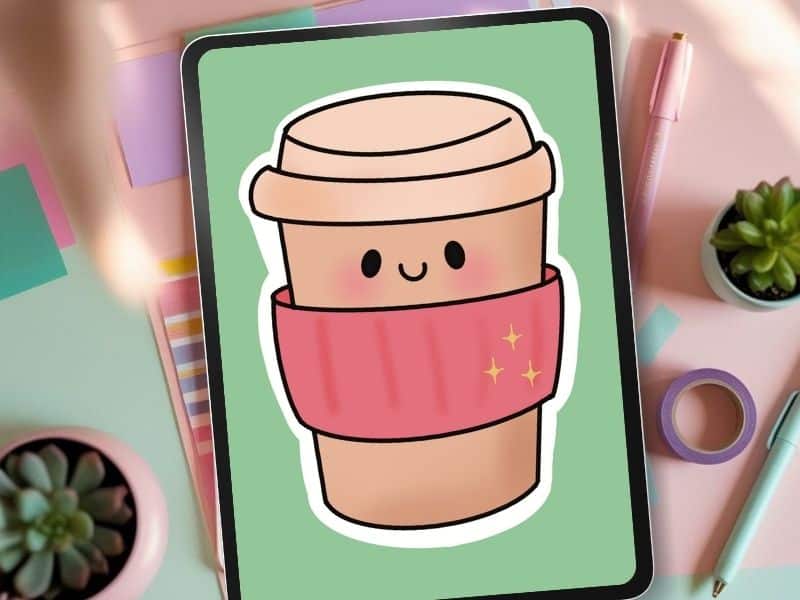
This coffee cup was made with brushes and stamps from my Procreate Starter Kit.
Sticker Brush Mini Pack (Cynthia’s Freebie):
Why it’s awesome: It includes Cynthia’s Sticker Brush (designed to be bold, forgiving, and stupid easy to use). You also get a few stamp brushes, perfect for building sticker sheets fast, with zero extra drawing required.
Best for: Outlines, doodle-style icons, and quick digital sticker sheets you can finish before your kid wakes up from a nap.
- Jingsketch Free Starter Pack:
Packed with versatile sketch and lining brushes. You’ll find options for lining, shading, and a lot more. This one’s been popular for years and is clean for Cricut. - Bardot Brush Freebies:
Big, bold, and super fun for doodle style stickers (look up the free brush section on their site). - Art with Flow:
- A treasure trove for Procreate lovers. Flo’s free brushes are polished, playful, and surprisingly beginner-friendly—even if you're the “I just opened Procreate yesterday” type. Think glitter textures, painty liners, and stamp brushes with major sticker potential.
Pro tip: Download only from the creator’s official site or Gumroad to keep your iPad drama-free.
Here’s why free community packs are gold:
- They’re usually tested by real artists (not robots).
- You get stamps, textures, and liners all in one go.
- They often come with helpful cheat sheets or mini tutorials for sticker newbies.
Never feel weird about using free brushes over paid ones. Many artists (myself included) keep going back to the same handful of “starter” brushes long after they find their groove.
The secret? Fast, forgiving tools that help you make stickers with no overthinking, just honest, messy fun.
The Best Paid Procreate Brushes for Stickers

Once you’ve tinkered with the freebies and want sticker designs that truly shine, it’s time to peek at paid Procreate brushes.
There’s no shame in wanting tools that save your sanity and flat out make stickers less stressful, especially when you only get a sliver of “me time” before the next snack request.
Paid brush sets often give you next level textures, sparkly glitter, easy breezy outlines, and stamp brushes that can turn your three minute art break into sticker gold.
So let’s talk about what makes the best Procreate brushes for stickers, and why investing a few dollars is totally worth it for busy, chaos-prone, sticker-loving moms.
I have purchased brushes from all the companies listed below, except the last one!

Specialty Brushes for Texture and Finishing Touches
Not all stickers are meant to look flat and boring. The right specialty brush can turn even the most basic doodle into something magical (think: glitter, subtle shadows, or outlines that don’t melt when you print).
When you want your stickers to pop off the page, literally or just look that way, look for these top-rated options:
Stamp Brushes for Fast Details: Sticker stamp brushes are like a shortcut button for busy moms.
Paid stamp sets often come jam-packed with icons, washi strip shapes, cute faces, stuff you’d lose hours drawing from scratch.
Drag, drop, resize, done. Lisa Glanz has lots of great stamp brushes in her Procreate brush sets!
Texture Brushes: Textured brushes, such as those in the Texture Lover's Bundle from Bardot Brush, give your stickers a “touched by a real human” vibe.
Grainy overlays, fabric-like grit, or paper textures help your art stand out in a sea of flat colors. Perfect if you want your work to look a smidge more artsy, and a lot less digital.
Metallic Brush and 3D Effects: This bundle’s the glow-up your sticker game didn’t know it needed.
Packed with 3D line brushes that pop, it’s perfect for adding quick faux-depth and that “did-you-handcraft-this?” look without hours of shading.
A great paid example: Ultimate 3D Brush Bundle For Procreate from Genevieve's Design Studio
Outline and Inking Brushes: I have not purchased any outline or inking brushes ( I made my own that you are welcome to snag), but this company, True Grit Texture Supply looks promising.
Now I want to buy more brushes! The key is to look for brushes that are made for thick, solid outlines.
Why? They don’t “bleed”; you get satisfying, bold edges that look just as sharp on a sticker sheet as they do on your screen.
Plus, smoother fills mean less time fussing and more time having fun.

Made using purchased texture brushes
Buying Guide: What to Consider Before Purchasing
Getting the best Procreate brushes for stickers isn’t just about picking the prettiest preview image.
There are some not-so-glam things to think about before you buy, especially when every dollar (and second) counts.
Here’s what you should keep in mind:
- Compatibility: Always, always check if the brush set works with your version of Procreate and that the brushes were made for Procreate before you hit buy. Some fancy features don’t play nice with older iPads. Nothing stings more than shelling out cash, then realizing your iPad says, “haha, nope.”
- Regular Updates: Some brush creators send out updates if Procreate makes big changes (or bugs happen). Crews like Bardot Brush or True Grit Texture Supply are awesome for this, they treat their customers like real humans, not just receipts.
- Artist Support and Documentation: A good brush set should come with instructions and the ability to ask the seller for help. Bonus points if the creator offers video demos or free mini tutorials. You don’t want to be left Googling at midnight when the brush acts funky.
- Match Your Style: Are you aiming for watercolor squishiness? Comic outlines? All the sparkle? Pick brushes that fit how you actually want your stickers to look. Some sets are all about intricate details, others make bold and simple. Save yourself buyer’s remorse by looking closely at sample images.
- Value Over Volume: One solid pack beats twenty random, so so brushes. The best Procreate brushes for stickers often include handy extras (like pre made shadows, outline options, or extra stamp sheets). If a bundle means you can do more with less toggling, that’s your winner.
- Reviews and Artist Reputation: Go with well known sellers or sites. Read reviews (even quick Instagram comments). If other busy moms say it’s fast, fun, and forgiving, trust that.
A good paid brush set isn’t just a tool, it’s a little time saving, chaos busting sidekick for your busy sticker dreams.
It is easy to spend all your free time shopping for new brushes, eh, hmm, says the chick who spent what felt like 2 hours trying to decide what new brushes she should buy.
Decision paralysis at its finest. I'm not sure why it's not acceptable to buy them all!
So be forewarned, you can spend lots of time ogling all the pretties you can make and find yourself spending lots of cash if you aren’t careful … there are still at least 2 more sets I have convinced myself I need right now!
I would set a timer and a budget!
The best Procreate brushes for stickers aren’t about perfection or looking like a pro.
They’re your shortcut to fun, stress-free creativity, even if your “me time” is shorter than a microwave coffee reheat.
The right brushes will help you relax, experiment, and maybe even laugh at your own squiggly outlines, because that’s half the point: giving your brain a break and rediscovering what’s fun for you.
Don’t be afraid to mix, match, or totally mess up your stickers. That’s where the real magic, and let’s be real, the stress relief, happens. If you want to get more out of your art sessions or just need a pep talk, check out how Procreate stickers can boost your confidence.
Or, when you’re ready to take the next step and build your own sticker pack, peek at the simple steps to design stickers for some friendly, zero-stress guidance.
Make a mess, finish something tiny, and call it a win. Your creative joy is in those little, imperfect stickers, promise. Thanks for hanging out, and doodling along. If you try a new brush and wind up with a sticker that actually makes you smile, you’re doing it perfectly.
🎥 Prefer to learn by watching?
I’ve got a YouTube channel full of quick, no-pressure tutorials made for tired, creative souls like you.
Subscribe here and catch your next creativity boost, one sticker at a time.
Love and messy buns,
❤️
Cynthia McDonald
Helping women find creativity in the chaos — with stickers, stationery, and a little bit of fun
Want More Procreate
Whether you’re just starting out or ready to try your next cute design, here’s a full list of tutorials, tips, and easy wins for making stickers in Procreate:
Start Here: Beginner-Friendly Guides
- Procreate Beginner Guide for Stickers
- Making Stickers in Procreate for Beginners
- How to Design Stickers in Procreate
- How Procreate Stickers Boosted My Confidence as a Creative Mom
- How Procreate Helped Me Reconnect with Creativity
- What I Learned from Trying A Daily Sticker Sketch Challenge(and Failing Sometimes Too)
Learn Cute Sticker Drawing Techniques
- Draw a Cute Blushing Star Sticker
- Designing a Cute Bunny Sticker
- How to Draw Cute Cherries
- Draw a Cloud in Procreate (Easy!)
- Design a Daffodil Sticker in Procreate
- Draw a Baby Duck in Procreate
- How to Make Your First Digital Sticker in Procreate (In 10 Minutes!)
- 3 Easy Outline Effects in Procreate That Make Your Stickers Pop
Procreate Tools, Ideas & Tips
- Easy Procreate Sticker Ideas
- Sticker Making Tips in Procreate
- Procreate vs Canva for Sticker Design
- How to Design Stickers
- Procreate Tools for Sticker Design: The Beginner’s Guide for Burnt-Out Moms
- Using Layers for Stickers in Procreate
- Clipping Masks For Procreate Stickers (with Less Stress and More Fun!)
- Best Canvas Size for Procreate Stickers (Beginner Guide)
- Best Procreate Brushes for Stickers (Free & Paid)
- Resizing Stickers in Procreate: The Busy Mom’s Guide to Sanity, Success, and Not Losing It
- Procreate Color Palettes for Stickers, Effortless Sticker Color Magic
- Eraser Tool Tips for Procreate Stickers (That Even Exhausted Moms Can Master)
I have also created an entire Procreate Starter Kit with a complete sticker file so you can see exactly how I made it!
Make sure and grab your favorite Pinterest Pin and Save it to your Digital Art Pinterest Board